
CBT Homework Apps Clinicians Can Actually Assign in 2026
A practical review of CBT homework apps for therapists — thought records, behavioral activation, and mood tracking — with what makes clients actually finish the assignment.
Read moreBrowser extension or in-app recorder? Why telehealth audio never reaches your microphone, which capture method to use when, and how consent differs remotely.

To record a telehealth session for AI notes, use the PsyFi browser extension rather than the in-app recorder. The in-app recorder captures your computer's microphone, which works for in-person sessions but not for telehealth, where the client's voice comes out of your speakers. The extension captures the meeting audio from the telehealth platform instead.
Install it from the Install Extension link in the Notes sidebar, which opens the Chrome Web Store. Once the session is captured, it lands in the same Transcripts list as an in-person recording, with the same transcript, the same generated note, and the same clinician review requirement.
This is the part clinicians most often get wrong on the first try, so it is worth being precise about the physics. This guide is about the capture decision specifically — if what you need is what a telehealth progress note has to contain, or why telehealth documentation is harder than in-person, those are covered separately.
The in-app recorder in PsyFi Notes records from your computer's microphone. In a room with two people in it, that microphone hears both of you, and you get a clean two-speaker transcript.
In a telehealth session, only one of you is in the room. Your voice goes into the microphone. Your client's voice comes out of your speakers — and if you are wearing a headset, which you probably should be, it does not enter the room at all. A microphone recording of that session captures a clear monologue from you and a faint, echoey, or entirely absent client. Transcription is only as good as its input, and half a conversation transcribes into a note that is worse than no note.
The browser extension solves this by capturing the meeting audio from the telehealth platform rather than the room. Both sides of the conversation, at the quality the platform is already carrying them at.
| Situation | Use |
|---|---|
| In-person session, both parties in the room | In-app recorder (/scribe/record) |
| Telehealth session on a browser-based platform | Browser extension |
| Telehealth on a desktop application, not a browser | Check the extension listing before assuming it works |
| Phone session | Neither — this is not a supported capture path |
| Hybrid: one client in the room, one joining remotely | Extension, with the in-room audio reaching the platform |
The last row is the one worth thinking through for couples and family work. If one participant is remote, everyone's audio needs to be going through the platform for the capture to be complete — which usually means the in-room participants are on the call too, not just talking across the desk at your laptop.
In the Notes sidebar there is an Install Extension link. It opens the extension's Chrome Web Store listing.
Install it from that link rather than from a web search. Browser extensions that record meeting audio are a category with a lot of lookalikes, and the sidebar link takes you to the right listing.
Beyond that, we are not going to walk you through the install screens here. The Web Store flow and the extension's own in-meeting interface change independently of this guide, and a how-to that describes buttons that have moved is worse than one that admits its limits. Follow the listing, and check the extension's own documentation for its in-meeting controls and which platforms it currently supports.
If the extension does not fit your setup — wrong browser, a desktop-app-only telehealth platform, a managed device you cannot install on — treat that as a real answer. Document those sessions the way you did before rather than improvising a capture method that produces a poor transcript.
The clinical consent conversation for a recorded telehealth session is the same one you would have in person: what is being recorded, what it is used for, how long it is kept, and that declining will not affect their care. Our guide on talking to clients about AI documentation covers what tends to land well.
Three things are genuinely different over telehealth, and they are worth planning for rather than discovering:
Jurisdiction can double. Recording consent law varies by state, and which state's rules apply when clinician and client sit in different states is genuinely unsettled in places. Treat this as a legal question rather than a documentation one: if you practise across state lines, have a healthcare attorney confirm which consent rule applies to your specific states before you build a cross-state recording practice on an assumption. The Center for Connected Health Policy's state-by-state telehealth policy tracker is a useful starting point for seeing how much the rules differ, but it is a research tool, not a substitute for advice on your own practice.
Your consent language may not cover it. Consent forms written for in-person work sometimes say "sessions" and mean the room. Check that yours explicitly covers recorded telehealth sessions and AI-assisted documentation. If it does not, update the form before you record, not after.
You cannot read the room the same way. In person, you can see hesitation when you ask. Over video you often cannot, especially on a small window with a lag. Ask the question with a little more space around it, and take an ambiguous answer as a no.
Platform-side setup is its own topic — audio routing, in-platform recording notices, and how your telehealth platform's own settings interact with consent all vary by vendor, and you will find those in the platform's documentation rather than here. For the documentation side, our best practices for documenting telehealth sessions covers the habits that keep remote-session notes defensible.
Everything downstream of capture is identical to an in-person recording, which is the useful part: there is no separate telehealth workflow to learn.
The session appears in the Transcripts list in the Notes sidebar, newest-first, alongside your in-person sessions and findable through the same Search transcripts… box. Opening it gives you the same transcript page: the session title, a metadata row with date and time, duration, and speaker count, a Transcript panel with speaker-labelled turns and a Find in transcript search, and Copy transcript and Download buttons.
The generated note is in the right-hand panel with edit, copy, and regenerate controls, in whichever of the five formats applies — see how to choose a note format if you have not set a default.
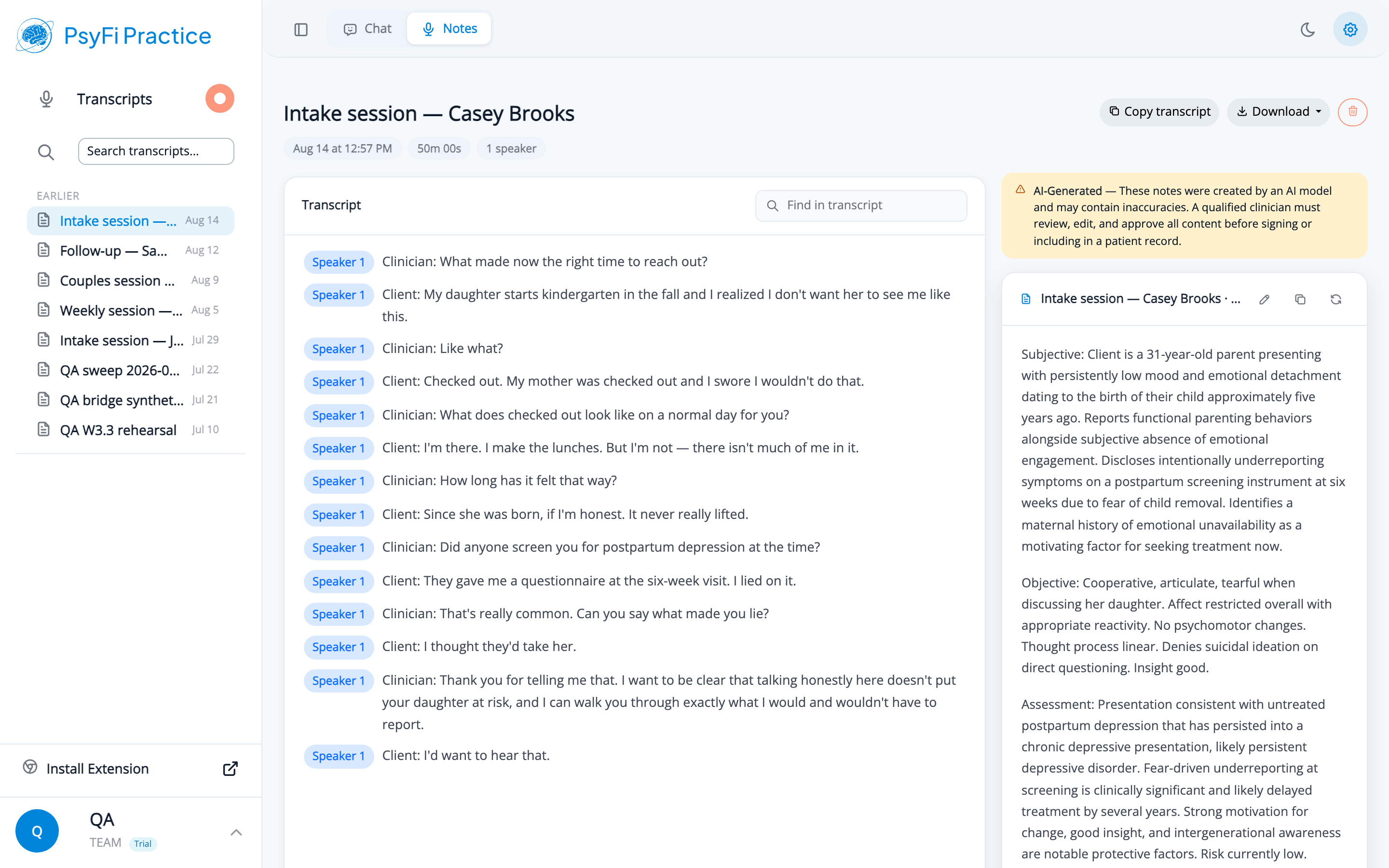
Screenshots use fictional demo sessions. The clients and session content are invented for illustration.
And the review requirement travels with it. The amber banner above the note says the content was created by an AI model, may contain inaccuracies, and must be reviewed, edited, and approved by a qualified clinician before it is signed or included in a patient record. Telehealth changes nothing about that.
If anything, review a little more carefully on telehealth notes. Network audio drops out, people talk over each other more on video than in person, and the transcript can be missing a phrase without giving you any sign that it is. If a passage in the note reads oddly, check it against the transcript before you assume the model invented it — sometimes the audio simply was not there.
Once the transcript exists, it behaves like any other. You can pull it into a chat conversation for a summary, a treatment plan update, or a referral letter, and put the resulting document in the drafting panel to finish it properly.
A telehealth-specific note on retrieval: sessions are stored in UTC, so an evening session can be filed under the next day's date. Given that telehealth caseloads skew toward evenings, this bites telehealth clinicians more than most. If a date returns nothing in chat, try the adjacent day — or better, write a descriptive session title at capture time and match on that instead.
Telehealth recording is a capture problem and a consent problem. Solve the capture problem with the extension rather than by pointing a microphone at a speaker. Solve the consent problem before the first recorded session, with language that covers recorded telehealth and AI-assisted documentation, in the strictest jurisdiction that applies to your caseload.
After that, it is the same workflow as everything else — which is laid out end to end in the session-to-signed-note walkthrough.
PsyFi Notes is HIPAA-aligned clinical documentation software backed by a Business Associate Agreement. For questions about capturing telehealth sessions in your practice, contact our onboarding team at [email protected].