
CBT Homework Apps Clinicians Can Actually Assign in 2026
A practical review of CBT homework apps for therapists — thought records, behavioral activation, and mood tracking — with what makes clients actually finish the assignment.
Read moreKeep a treatment plan, letter, or summary in an editable document beside your chat instead of losing it in scrollback. A guide to the PsyFi drafting panel.

The drafting panel in PsyFi Practice is an editable document that opens to the right of your chat. Ask chat to draft something and add "put it in the drafting panel so I can edit it" — a tool chip reading "Update draft" appears and the panel opens with the formatted document.
The header carries the document title plus edit, copy, and close controls, and the draft persists with the conversation, so it is still there when you come back. The point is that your conversation stays a conversation while the document accumulates beside it, instead of being buried in scrollback.
Anyone who has drafted a treatment plan in a chat interface knows the failure mode. The first version appears. You ask for a change to the third goal. A second full version appears. You ask for a different tone in the interventions. A third version appears. Twenty minutes later there are five near-identical documents interleaved with your instructions, and finding the current one means scrolling and comparing.
The conversation and the artifact are two different things, and a single scrolling column is a bad container for both. The drafting panel separates them: the chat holds the back-and-forth, the panel holds the document, and the document has one current state rather than a version history you have to reconstruct by eye.
There is no button. You ask, and you say where the output should go.
Draft a treatment plan for a client presenting with generalized anxiety and avoidance around work meetings. Include three measurable goals with interventions for each. Put it in the drafting panel so I can edit it.
Two things happen. A tool chip reading "Update draft" appears in the conversation, and a document panel opens to the right with the drafted treatment plan rendered as a formatted document — headings, numbered goals, interventions under each — rather than as a wall of chat text.
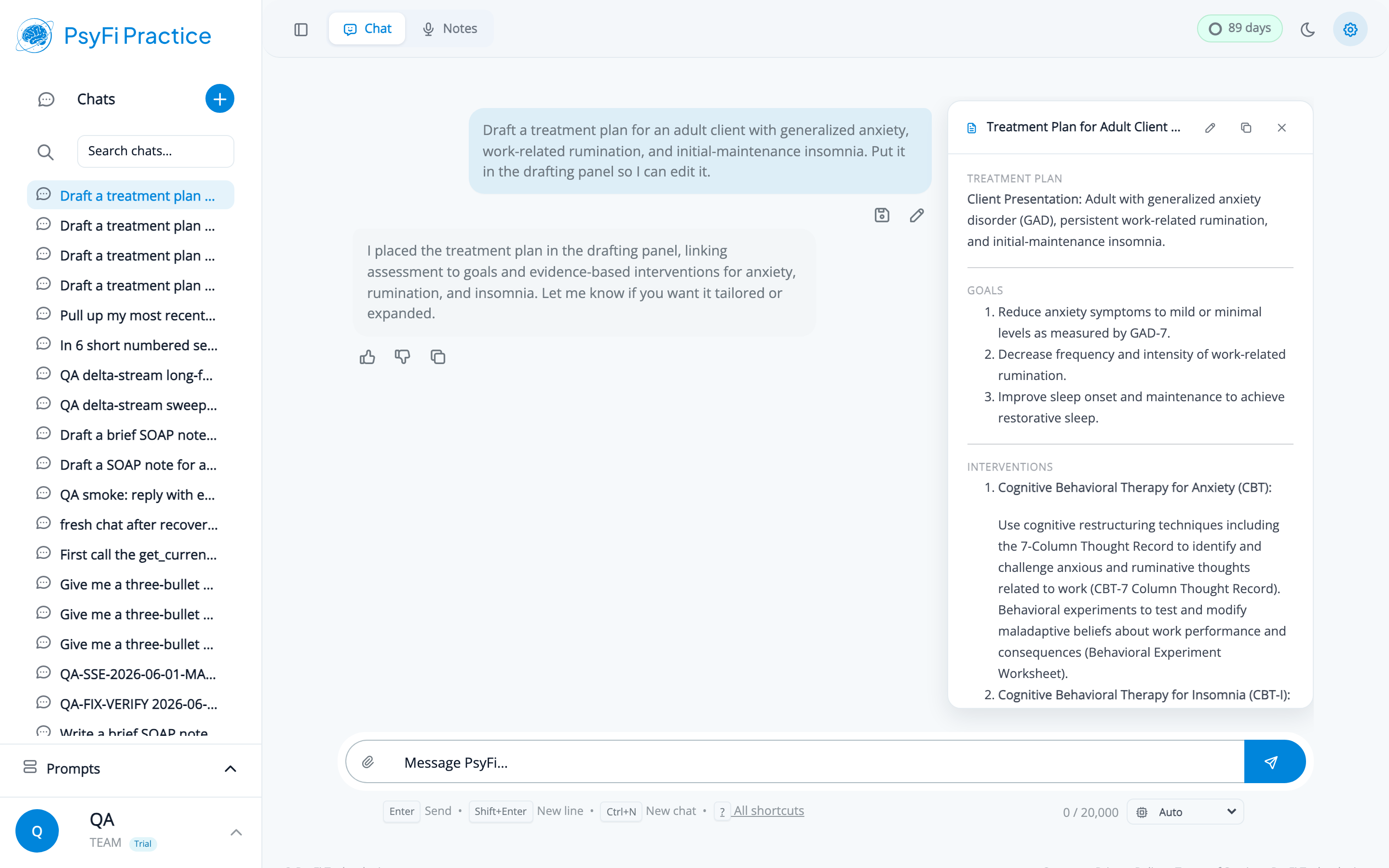
This screenshot uses fictional demo content. The client and clinical details are invented for illustration.
The phrase you use does not need to be exact. "Put this in the drafting panel", "draft that in the panel", and similar all work. What matters is signalling that you want a document rather than a chat reply.
Once the panel is open, you have a split workspace. The conversation on the left, the document on the right.
The panel header shows the document title along with edit, copy, and close controls. The body renders the formatted document. You can edit directly in the panel for wording changes, or keep talking to chat for structural ones:
Goal 2 is too vague to be measurable. Rewrite it with a frequency target and a review date.
Add a section on relapse prevention after the interventions.
The interventions read like a textbook. Make them sound like something I'd actually write.
Each revision updates the document in place. The conversation keeps its shape as a conversation — your instructions and the assistant's responses — while the document on the right converges on something you would put your name to.
If you want more room, collapsing the left sidebar gives the chat and panel the full window, which is the layout most people settle into once they are actually editing.
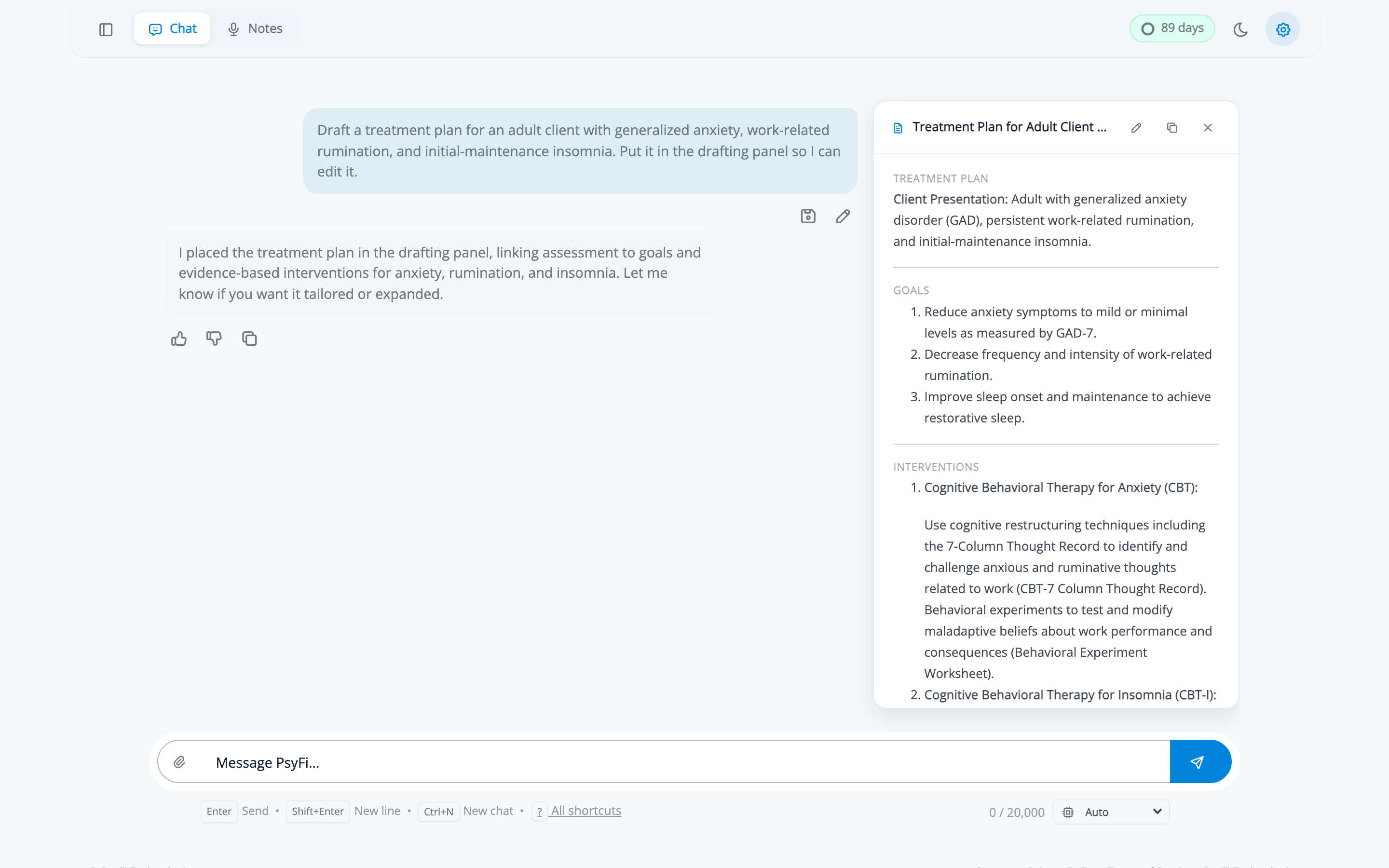
The draft persists with that chat. Close the conversation, see two clients, come back — the document is still in the panel, with your edits.
This changes what the panel is for. It is not just a nicer way to view one response; it is a place a document can live while it is unfinished. A prior-authorization letter you start on Monday and finish on Wednesday when the payer's requirements come back. A treatment plan you draft after the session and revise after supervision. A discharge summary you build across the last few sessions of a course of treatment.
The practical habit: give each in-progress document its own conversation. One chat, one artifact, easy to find again.
The panel earns its place for documents with structure you will iterate on:
What it is not for: a quick question with a one-line answer. Asking for a document when you wanted a sentence just adds a panel you have to close.
The drafting panel makes editing easy, which is the point — but easy editing is not the same as a reviewed document, and the ease is not a licence to skim.
Anything clinical that comes out of the panel needs the same treatment as any AI-assisted documentation: a qualified clinician reviews, edits, and approves it before it is signed, filed, or sent. Specifically:
Our post on what to expect from AI therapy note accuracy covers where drafts tend to be strong and where they need a hand, which is a useful thing to have calibrated before you start editing quickly.
The drafting panel is the last step of a loop that starts with a recorded session. Record it, pull the transcript into chat, reason about it, and put the document that comes out of that reasoning into the panel where you can finish it properly. The full path, worked end to end on a single session, is in the session-to-signed-note walkthrough.
PsyFi Practice is HIPAA-aligned clinical documentation software backed by a Business Associate Agreement. For questions about AI-assisted clinical drafting in your practice, contact our onboarding team at [email protected].